![ExPrep Logos 6.6.24_Black-2.png]](https://support.excelpreparation.com/hs-fs/hubfs/ExPrep%20Logos%206.6.24_Black-2.png?height=40&name=ExPrep%20Logos%206.6.24_Black-2.png)
Creating a Master Course Shell for each course that you teach will allow you to house all of your assignments and then copy the course to live sections each semester or share the content with a colleague.
To create a Master Course Shell:
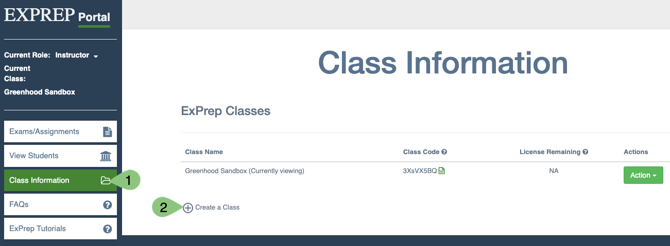
- From the ExPrep Portal, navigate to Class Information
- Select Create a Class which can be found near the bottom of your existing class list
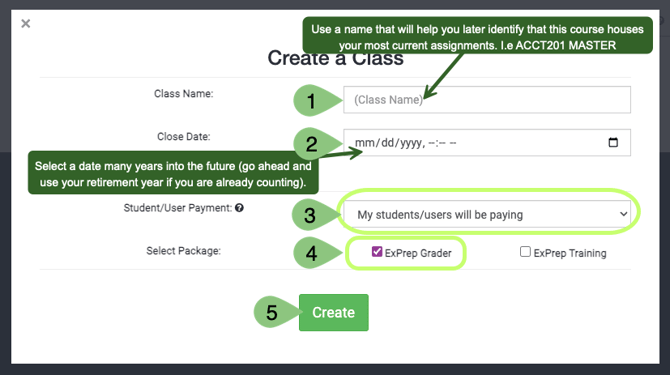
- Enter a Class Name
- we recommend using something that will be easy to identify as the course that holds your most current assignments. I.e. Acct201 MASTER
- Enter a Close Date
- This should be a date many years out because you will continue to use this course.
- Set the Student/User Payment to My students/users will be paying
- Students won't actually enroll in this particular class anyway
- Set the Package to ExPrep Grader
- Hit the Create button
What is next?
You now have your Master Course Shell created and can start uploading your assignments. Some next steps for you might include:
- Sending ExPrep your Assignments for Grading Automation Development
- Adding the Student Orientation Assignment to your Course
- Copying Assignments From One Class to Another