![ExPrep Logos 6.6.24_Black-2.png]](https://support.excelpreparation.com/hs-fs/hubfs/ExPrep%20Logos%206.6.24_Black-2.png?height=40&name=ExPrep%20Logos%206.6.24_Black-2.png)
If you need to update a student's grade on assignment, you can do so by following the steps described below:
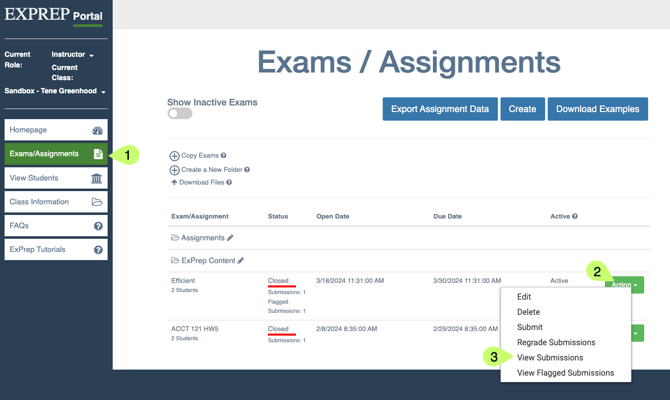
To edit a student's grade on a particular assignment:
- ➡️ Exams/Assignments tab
- Locate the assignment
- ➡️ Action button
- ➡️ View Submissions button
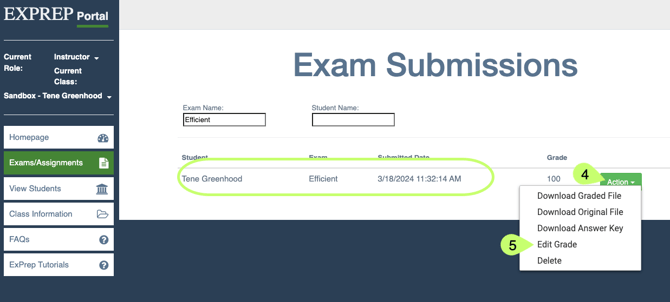
- Locate the submission that needs changed
- ➡️ Action button
- ➡️ Edit Grade
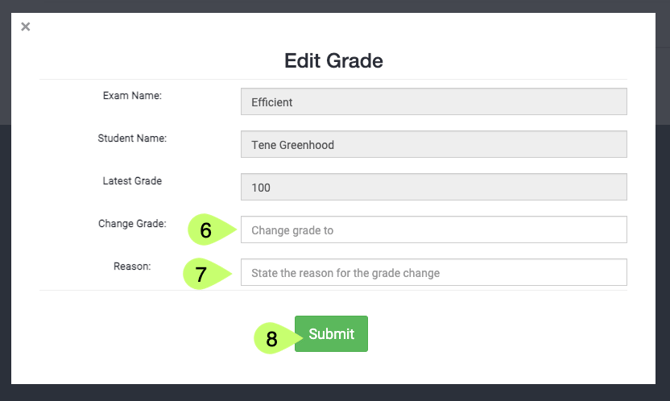
- Update the grade on the pop-up menu
- ➡️ Submit
⚠️If you have an LMS connection to ExPrep, editing the grade in ExPrep will not change it in your LMS. We recommend making grade changes directly in your LMS.