![ExPrep Logos 6.6.24_Black-2.png]](https://support.excelpreparation.com/hs-fs/hubfs/ExPrep%20Logos%206.6.24_Black-2.png?height=40&name=ExPrep%20Logos%206.6.24_Black-2.png)
This article will help if you want to complete an export for further analysis or to upload the grades into your LMS. This article includes:
Exporting Assignment Data Out of the Portal
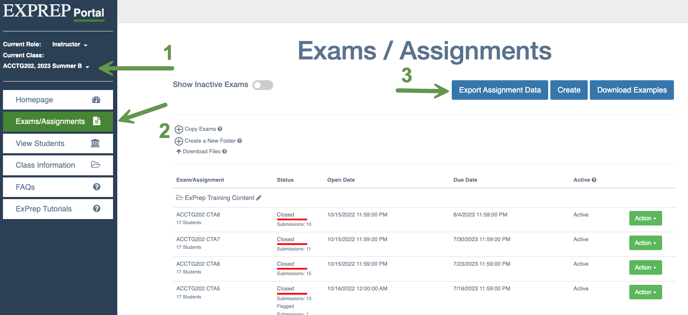
- Log into the ExPrep Portal
- Navigate to the relevant course
- ➡️ Exams/Assignments tab
- ➡️ Export Assignment Data button near the upper right hand area
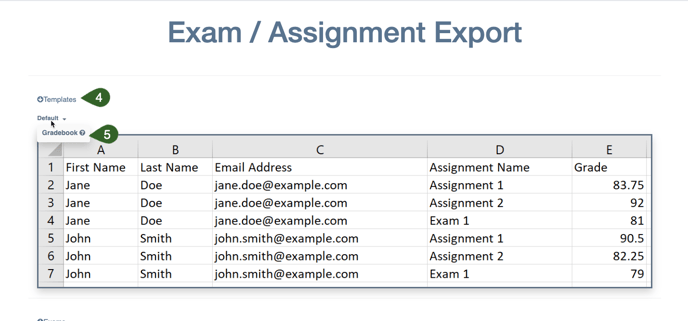
- ➡️ Templates button
- ➡️ Gradebook option will automatically generate the fields to be exported in a manner that aligns with most LMS systems
- Select the exams to be included in the export
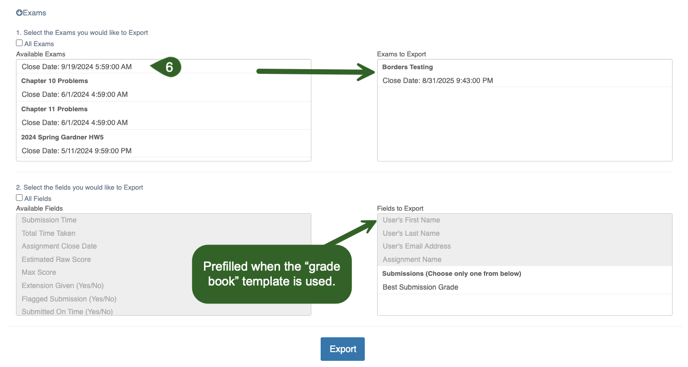
- ➡️ Export
- The file will be downloaded for you to merge with an LMS import file or to use however you see fit.
💡If you do not use the grade book template, you can manually select which fields to export. However, if you intend to import the grades into your LMS grade book, we highly recommend using that template.
Importing Grades into LMS
Every LMS is going to have a slightly different process on how to import the grades. In general, there will be a .CSV template file provided by the LMS. Then, you can move the grades from your exported file (as explained above) into your template and upload the .CSV into your LMS.
Here are some links with information on how to import grades for the various LMS systems:
💡Pro Tip: You can use a XLOOKUP to transfer the grades from your ExPrep Export file into your LMS Import file.
If the student ids don't match between the two files, try using a TEXTBEFORE function to pull apart their email address.
If you need additional help, reach out to our support team.