![ExPrep Logos 6.6.24_Black-2.png]](https://support.excelpreparation.com/hs-fs/hubfs/ExPrep%20Logos%206.6.24_Black-2.png?height=40&name=ExPrep%20Logos%206.6.24_Black-2.png)
⚠️If your ExPrep account is integrated with your LMS account, then there is no need to provide your students with a course code. They will be automatically enrolled when they launch from your LMS.
If your ExPrep account is NOT integrated with your LMS, then you can locate your course code by using the following steps:
- Log into your ExPrep Portal
- ➡️ Class Information
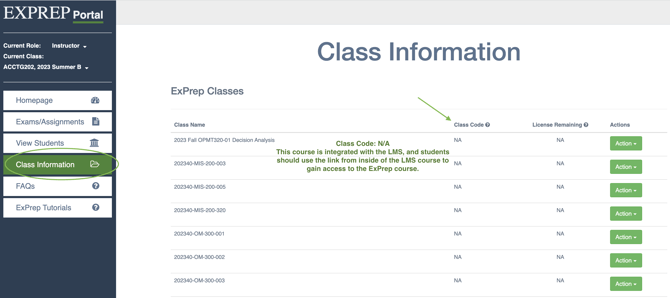
- Under the "class code" column you will see your course code
 with a small document icon. If you click on this icon, it will download a word document with directions for your students on how to get enrolled in your ExPrep course. The directions can be edited as you see fit.
⚠️Be cautious if you copy over a course shell in your LMS from a previous semester or a colleague. If you do not update the file with the course code, all of your students will end up enrolling in the wrong class!