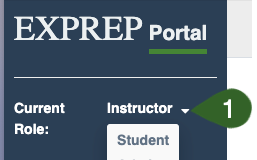
To toggle your view of the portal between "Instructor" and "Student":
- ➡️ Drop-down menu from the upper left hand corner next to Current Role
- ➡️ Select the desired role
![ExPrep Logos 6.6.24_Black-2.png]](https://support.excelpreparation.com/hs-fs/hubfs/ExPrep%20Logos%206.6.24_Black-2.png?height=40&name=ExPrep%20Logos%206.6.24_Black-2.png)
To toggle your view of the portal between "Instructor" and "Student":