![ExPrep Logos 6.6.24_Black-2.png]](https://support.excelpreparation.com/hs-fs/hubfs/ExPrep%20Logos%206.6.24_Black-2.png?height=40&name=ExPrep%20Logos%206.6.24_Black-2.png)
There are two different methods to view your student's assignment submissions:
- To view all of the submissions for a particular assignment
- To view all of the submissions for a particular student
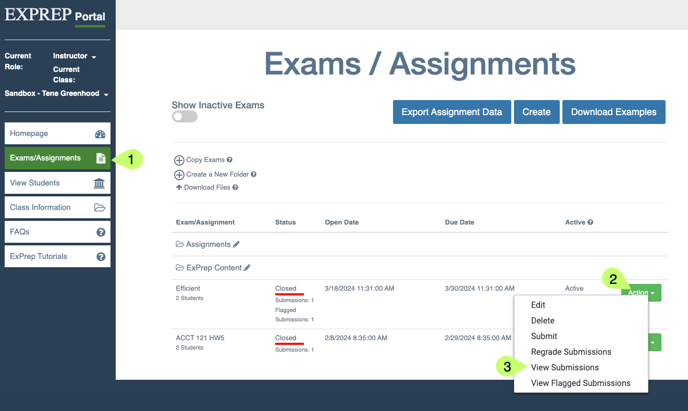
To view all of the submissions for a particular assignment
- ➡️ Exams/Assignments tab
- locate the assignment
- ➡️ Action button
- ➡️ View Submissions
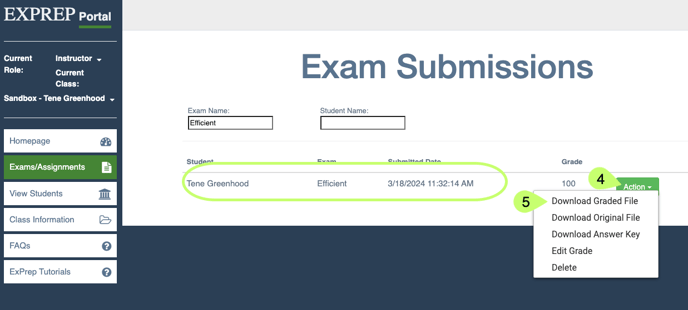
At this point you will have a list of all of the students' submissions for this particular assignment. If you want to download the file associated with a submission:
- locate the submission
- ➡️ Action button
- Select the file you would like to download
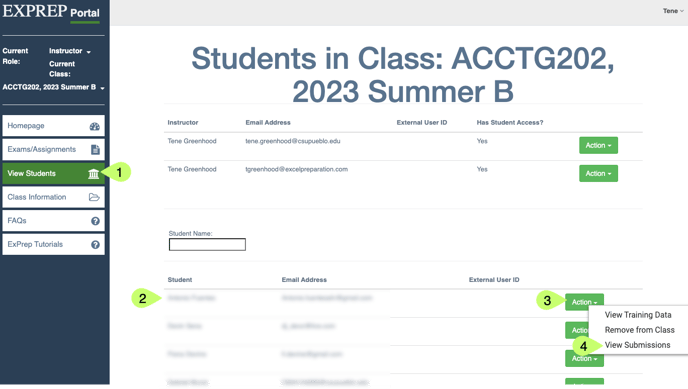
To view all of the submissions for a particular student
- ➡️ View Students tab
- Locate the appropriate student
- ➡️ Action button
- ➡️ View Submissions
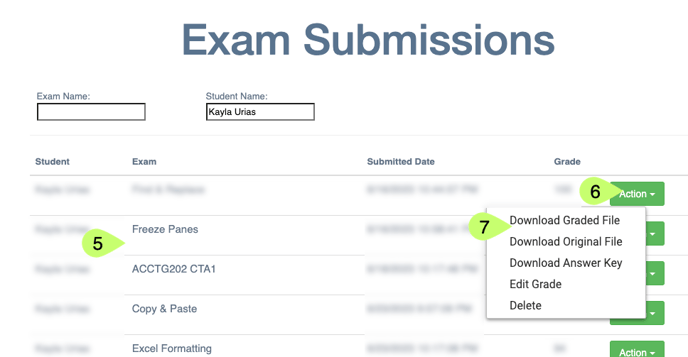
At this point you will have a list of all of the assignment submissions for this particular student. If you want to download the file associated with a submission:
- Locate the submission
- ➡️ Action button
- Select the file you would like to download