![ExPrep Logos 6.6.24_Black-2.png]](https://support.excelpreparation.com/hs-fs/hubfs/ExPrep%20Logos%206.6.24_Black-2.png?height=40&name=ExPrep%20Logos%206.6.24_Black-2.png)
To submit a file on behalf of a student:
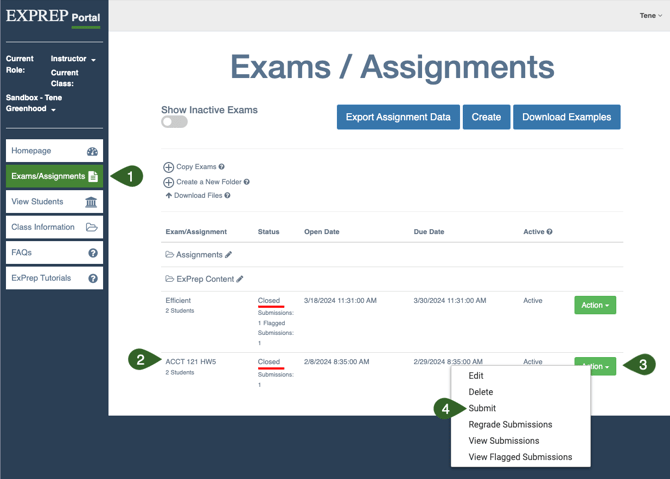
- ➡️ Exams/Assignments tab
- ➡️ Locate appropriate assignment
- ➡️ Action button
- ➡️ Submit
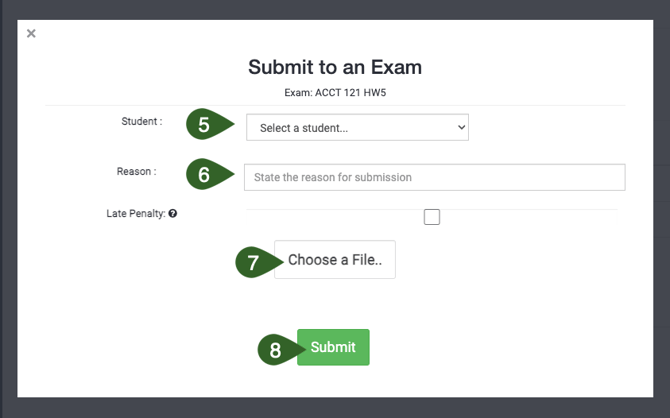
- ➡️ Select the correct student from the drop-down menu
- Type a short explanation/reason that you are submitting on behalf of the student - this is not publicly accessible.
- Apply a late penalty if appropriate
- ➡️ Choose a File... to select the appropriate file from your computer.
- ➡️ Submit