![ExPrep Logos 6.6.24_Black-2.png]](https://support.excelpreparation.com/hs-fs/hubfs/ExPrep%20Logos%206.6.24_Black-2.png?height=40&name=ExPrep%20Logos%206.6.24_Black-2.png)
If a course previously in your dropdown list is missing, it is most likely because the class close date has passed.
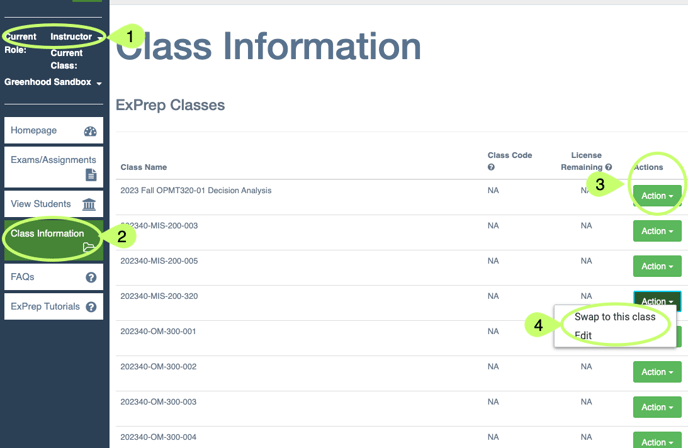
Accessing a Closed Class
To access a closed class:
- Log into the ExPrep Portal
- Ensure that you are in the Instructor role.
- ➡️ Class Information tab
- Locate the class
- ➡️ Green Action button
- Swap to this class
- This option will open the class and you can see assignments, etc.
- Edit
- If you need to modify the close date/want the class to be available in our drop down menu again, use the edit option to update the close date.
- Swap to this class